Samarth Portal Payment Failed: Causes, Fixes, and What to Do If Money Is Deducted (2026 Guide)
Many students encounter payment issues while submitting admission forms, examination fees, hostel fees, registration charges, or semester fees through the Samarth Portal. A payment may fail due to banking problems, payment gateway interruptions, heavy server traffic, browser issues, or temporary technical glitches on the portal. Students across multiple universities using the Samarth platform have reported fee payment and transaction-related problems during admission and examination periods.
This guide explains why Samarth Portal payment failures happen and how to resolve them safely without making duplicate payments.
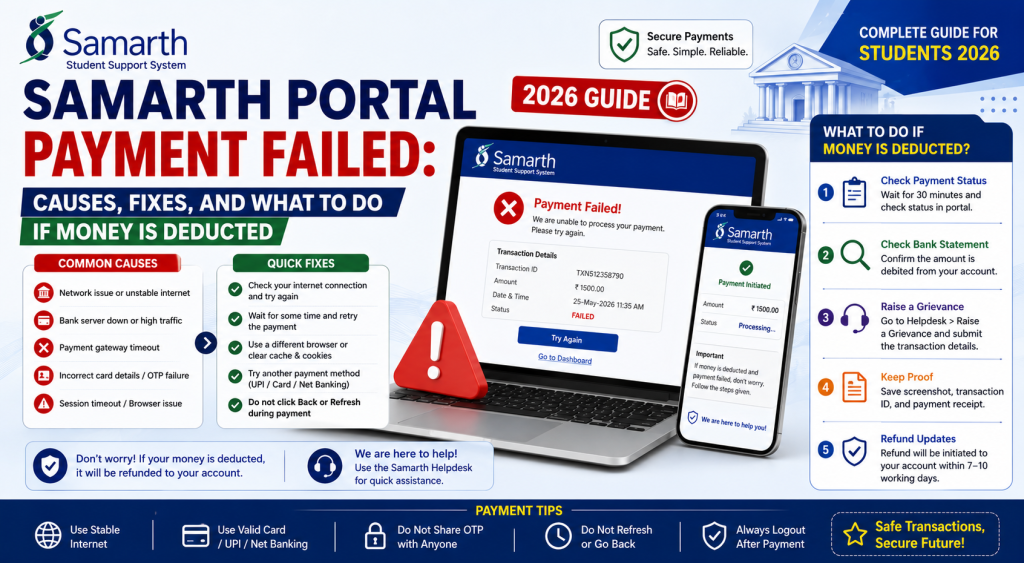
Why Does Samarth Portal Show “Payment Failed”?
Payment failures can occur for several reasons:
- Bank server issues
- Payment gateway timeout
- Poor internet connection
- Session expiration
- Heavy portal traffic
- Browser compatibility problems
- Technical glitches on the portal
Payment-related issues are commonly reported during admission deadlines and examination registration periods when portal traffic increases significantly.
Common Samarth Portal Payment Errors
Payment Failed but Money Deducted
One of the most common issues occurs when the amount is deducted from the bank account but the portal still shows “Payment Failed” or “Payment Pending.” Students have reported cases where payments were completed but portal records were not updated immediately.
Payment Pending
Sometimes the bank confirms the payment, but the transaction remains under processing on the portal.
Transaction Failed
The payment gateway may fail before completing communication with the Samarth Portal.
Receipt Not Generated
A successful payment may not immediately generate a receipt because the portal takes time to synchronize transaction records.
Gateway Timeout Error
Payment gateways occasionally time out when processing large volumes of transactions during peak admission periods.
How to Fix Samarth Portal Payment Failed Error
Wait Before Making Another Payment
The first step is patience.
Many transactions update automatically within a few hours after successful bank processing. Immediate repayment may create duplicate transactions. Samarth-related guides recommend avoiding repeated payments until transaction status is confirmed.
Check Payment History
Log in to your dashboard and review:
- Payment History
- Transaction Details
- Fee Status
- Receipt Section
Sometimes the payment is recorded even though the dashboard takes time to refresh.
Verify Bank Transaction Status
Check:
- Bank account statement
- UPI app history
- Credit card transaction history
- SMS confirmation
- Email confirmation
This helps determine whether the payment actually failed or only the portal update failed.
Clear Browser Cache
Browser-related issues may prevent status updates.
Steps:
- Clear browser cache.
- Clear cookies.
- Restart the browser.
- Log in again.
- Check payment status.
Try a Desktop Browser
Many users experience fewer technical issues on:
- Google Chrome
- Microsoft Edge
- Mozilla Firefox
Some students report better performance on desktop devices than mobile browsers.
Money Deducted but Payment Failed
This situation causes the most concern among applicants.
What Should You Do?
If money is deducted:
- Save the transaction ID.
- Take screenshots of the payment confirmation.
- Check Payment History on the portal.
- Wait for the transaction update.
- Monitor your bank account.
In many cases, failed transactions are automatically refunded within 24 to 72 hours.
Do Not Pay Again Immediately
Avoid making another payment on the same day if the previous transaction is still pending. Multiple guides warn that duplicate payments can create additional refund complications.
How to Check Samarth Payment Status
Step 1
Login to the Samarth Portal.
Step 2
Open your student dashboard.
Step 3
Navigate to the Payment or Fee section.
Step 4
View Transaction History.
Step 5
Check:
- Payment Status
- Transaction ID
- Receipt Availability
- Application Status
What If the Payment Is Still Not Updated?
If the payment status remains incorrect after several days:
Contact University Helpdesk
Provide:
- Application Number
- Transaction ID
- Payment Date
- Payment Screenshot
- Bank Reference Number
Raise a Support Request
Most universities operating through Samarth provide dedicated admission or examination support channels.
Keep Proof of Payment
Always save:
- Payment receipt
- SMS confirmation
- Bank statement
- UPI reference number
- Screenshot of payment success page
These documents are essential when resolving payment disputes.
Tips to Avoid Payment Failures
Use a Stable Internet Connection
Avoid making payments on weak mobile networks.
Use Updated Browsers
Keep your browser updated before starting the transaction.
Avoid Peak Hours
Heavy portal traffic during deadlines may increase payment failures. Many students report improved performance during off-peak hours.
Complete Payment in One Session
Do not refresh the payment page while the transaction is processing.
Wait for Redirection
After payment, wait for the system to redirect back to the portal before closing the browser.
Frequently Asked Questions
Why is Samarth Portal showing payment failed?
This may occur due to payment gateway issues, server overload, browser problems, internet interruptions, or bank processing delays.
Money was deducted but payment failed. What should I do?
Save the transaction details, wait for the portal to update, and avoid making another payment immediately. Refunds are often processed automatically within a few days.
How long does a refund take?
Refund timelines depend on the bank and payment gateway, but many failed transactions are reversed within 24–72 hours.
Can I make the payment again?
Only after confirming that the previous transaction has failed and will not be processed. Duplicate payments can lead to refund complications.
Where can I check my payment status?
You can review payment information in the Payment History or Fee section of your Samarth Portal dashboard.
Conclusion
Samarth Portal payment failures are usually caused by temporary technical issues, payment gateway interruptions, heavy traffic, or banking delays. By checking transaction records, avoiding duplicate payments, and keeping proof of payment, most issues can be resolved without difficulty. If the problem continues, contact the university helpdesk and provide complete transaction details for faster resolution.